
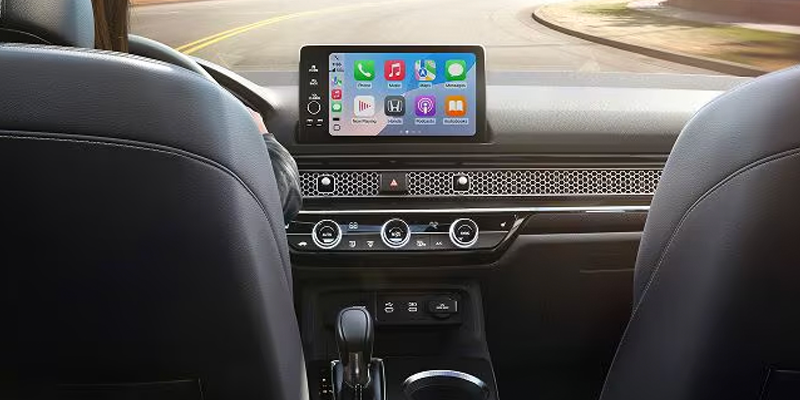
Apple CarPlay® has become one of the most natural ways to integrate an iPhone® into the driving environment. Once connected, navigation, calls, messages, and audio apps move into the Honda infotainment system with minimal fuss, creating a safer, more intuitive experience for drivers in Helena, MT. It suits the rhythm of daily commuting as easily as longer journeys beyond the city limits.
Marthaler Honda of Helena helps drivers make full use of this technology and setting it up takes only a moment once you know the sequence.
Step-by-Step Guide to Apple CarPlay® Setup
Begin by confirming that the iPhone® runs iOS 7.1 or later and that the Honda model supports Apple CarPlay®. Most recent vehicles, including the latest Honda CR-V® and Accord®, are equipped as standard. Once settled in the driver’s seat, connect the iPhone® to the USB port marked with the CarPlay® symbol using a certified Lightning cable. The system will prompt you through the setup on the central display; selecting Smartphone Connection or the Apple CarPlay® option will start the link. An approval message appears on the iPhone® and tapping Allow completes the handshake between phone and car. From there, apps can be arranged to suit personal preferences via the iPhone® settings menu.
If any part of the process proves unclear, the team at Marthaler Honda of Helena can walk drivers through the setup in person.
Key Features of Honda Infotainment with Apple CarPlay®
Honda has shaped its recent interiors around clarity and ease of use, and Apple CarPlay® integrates neatly into that philosophy. Navigation transfers to the large center display, allowing Apple Maps and similar apps to provide directions with real-time traffic data. Communication becomes safer with Siri® handling calls and messages by voice. Entertainment options—from playlists to podcasts—slot into the interface without distraction. The overall effect is an infotainment system that feels coherent rather than cluttered, and that cohesion is what makes Apple CarPlay® so valuable on busy Helena roads.
Troubleshooting Common Apple CarPlay® Issues
Even reliable systems occasionally need a nudge. If the connection doesn’t initiate, the simplest checks often resolve the issue. Ensuring the Lightning cable remains in good condition and firmly connected at both ends is a sensible first step. Confirming that the iPhone® and the Honda infotainment software are up to date can also restore communication quickly. In cases where the permissions were declined during setup, revisiting the CarPlay® settings within the iPhone® will allow the system to reconnect. Restarting the phone or cycling the infotainment power can clear any temporary communication faults.
Should difficulties persist, Marthaler Honda of Helena can diagnose the issue directly.
Experience Apple CarPlay® at Marthaler Honda of Helena
Apple CarPlay® brings order and simplicity to the driving environment, merging the familiarity of an iPhone with the thoughtful layout of a modern Honda. Drivers in Helena, MT gain a safer, more seamless way to stay connected on the road, whether following a winter route across town or setting out toward the mountains. For hands-on assistance with setup or a closer look at the wider Honda infotainment features, Marthaler Honda of Helena is ready to help.
Connect with us


- 2025 Honda Odyssey
- 2025 Honda Ridgeline
- 2025 Honda Ridgeline Helena, MT
- 2026 Honda CR-V
- 2026 Honda CR-V Features
- 2026 Honda CR-V Hybrid
- 2026 Honda HR-V
- 2026 Honda Passport Helena, MT
- 2026 Honda Pilot
- 2026 Honda Pilot Trim Levels
- 2026 Honda Ridgeline
- 2026 Honda Tech
- Accord
- Accord Hybrid
- Apple CarPlay® Setup in Your Honda
- Auto Winterize Service Helena, MT
- Best 2025 Honda SUV Models
- Best 2026 Honda SUVs
- Best Honda Family SUV
- Brake Repair Helena, MT
- Car Battery Helena, MT
- Civic
- Civic Hatchback
- Connecting your phone to your Honda
- CPO Honda in Helena, MT
- CR-V
- CR-V Hybrid
- Engine Light Helena, MT
- Everything You Need to Know About the 2026 Honda HR-V
- Helena Honda Dealer
- Helena Honda Service
- Helena SUVS For Sale
- Helena Used Cars
- Helena Used Honda For Sale
- Helena, MT Auto Loan
- Helena, MT Honda CR-V
- Helena, MT Honda HR-V
- Helena, MT Honda Lease
- Helena, MT Honda Loan
- Helena, MT Honda Maintenance
- Helena, MT Honda Odyssey
- Helena, MT Honda Service
- Helena, MT Honda Service Center
- Helena, MT New Honda CR-V
- Helena, MT New Honda SUV
- Helena, MT Oil Change
- Honda
- Honda Battery Helena, MT
- Honda Brake Tips Helena
- Honda Brakes
- Honda Brakes Helena, MT
- Honda Check Engine Light
- Honda Check Engine Light Tips
- Honda Dealer in Helena, MT
- Honda Engine Helena, MT
- Honda Engine Light Helena, MT
- Honda Finance Center Helena, MT
- Honda Loans Helena, MT
- Honda Oil Change Importance
- Honda Oil Change Montana
- Honda Passport Helena, MT
- Honda Pilot Helena, MT
- Honda Ridgeline Helena, MT
- Honda SUVs Helena, MT
- Honda Tires In Helena, MT
- Honda Tires In Montana
- Honda Trade In
- Honda Trucks Helena, MT
- Honda Upgrade Helena, MT
- Honda Winterize Service Helena, MT
- HR-V
- Marthaler Honda of Helena
- Marthaler Honda of Helena CPO Cars
- Marthaler Honda of Helena Service
- New Brakes Helena, MT
- New Honda CR-V
- New Honda HR-V
- New SUVs Helena, MT
- New Tires In Helena, MT
- New Trucks Helena, MT
- Odyssey
- Oil Change Helena, MT
- Passport
- Pilot
- Prologue
- Ridgeline
- Tire Shop In Helena, MT
- Trade In Value Helena, MT
- Uncategorized
- Used Car Trade In Helena, MT
- When does my Honda need an Oil Change?